Quickstart: Standalone Gateway CLI
This guide is for teams that want one shared gateway their applications can call. You will install GoRoute, configure a provider, start the service, and check that it responds. For an in-process setup inside a Go application, use the Go SDK quickstart.
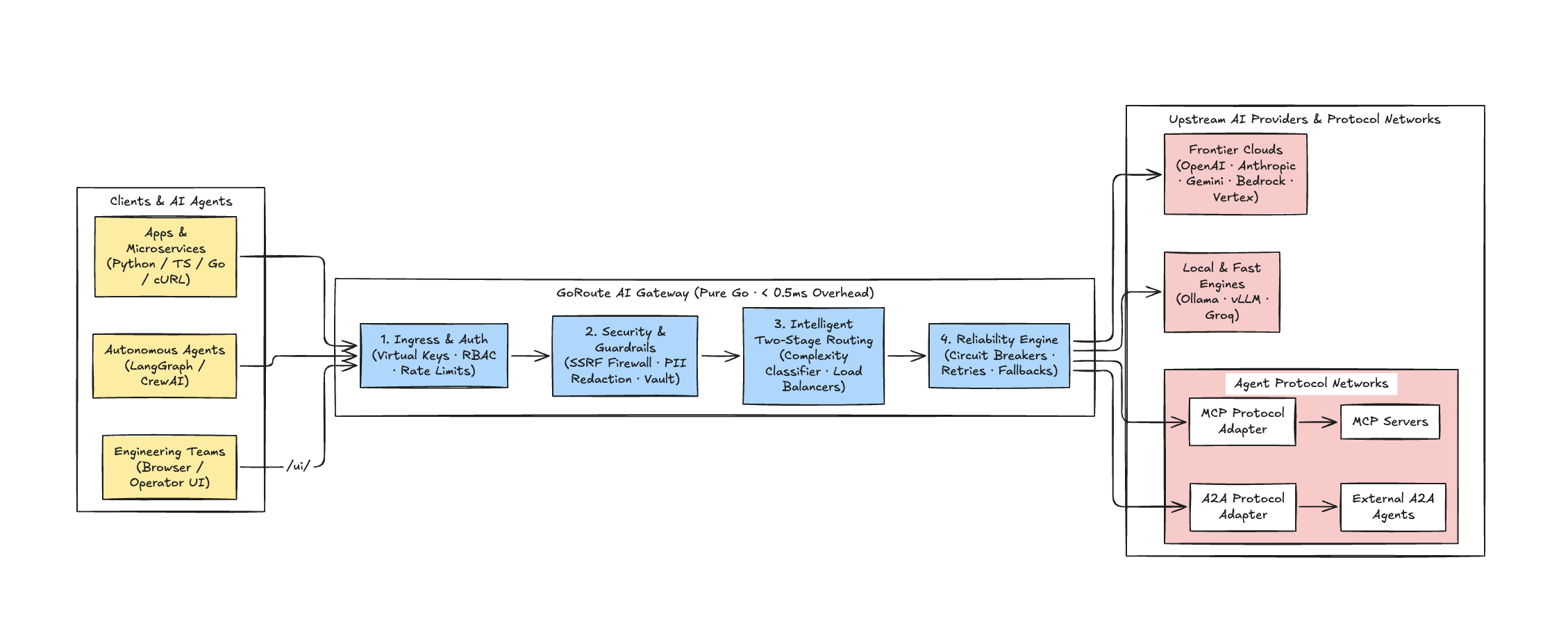
[!NOTE] GoRoute runs as a single static binary with no external interpreter dependencies. It includes an embedded Operator Web UI accessible directly at
http://localhost:8080/ui/.
1. Quick Installation
Option A: Universal Shell Installer (Recommended)
Install the compiled binary directly to /usr/local/bin (or ~/.local/bin):
curl -fsSL https://raw.githubusercontent.com/goroute-ai/ai-gateway-go/main/install.sh | bash
To install a specific release version:
curl -fsSL https://raw.githubusercontent.com/goroute-ai/ai-gateway-go/main/install.sh | bash -s -- v1.8.0
Verify the installation:
ai-gateway -version
Option B: Build from Source
If you have Go 1.26+ installed:
git clone https://github.com/goroute-ai/ai-gateway-go.git
cd ai-gateway-go
go build -o ai-gateway ./cmd/gateway
2. Configure the Gateway
Create a minimal configuration file config.yaml or use the provided template:
server:
  port: 8080
  host: "0.0.0.0"

auth:
  master_admin_key: "sk-gw-admin-secret-key-12345"

storage:
  mode: "memory" # Use "postgres" for persistent multi-tenant production

providers:
  openai:
    api_key: "env.OPENAI_API_KEY"
  anthropic:
    api_key: "env.ANTHROPIC_API_KEY"
  gemini:
    api_key: "env.GEMINI_API_KEY"
  ollama:
    base_url: "http://localhost:11434"

model_groups:
  - name: "fast"
    routing_strategy: "weighted-shuffle"
    deployments:
      - provider: "gemini"
        model: "gemini-2.5-flash"
        weight: 60
      - provider: "openai"
        model: "gpt-4o-mini"
        weight: 40
  - name: "reasoning"
    routing_strategy: "latency-based"
    deployments:
      - provider: "anthropic"
        model: "claude-3-5-sonnet-20241022"
        weight: 100
[!TIP] Provider API keys can be passed directly as environment variables or referenced dynamically with
env.VARIABLE_NAME.
3. Start the Gateway
Launch the service pointing to your configuration file:
./ai-gateway -config config.yaml
The gateway immediately initializes routes, background workers, and the embedded Operator Web UI on port 8080.
4. Launch the Operator Web UI
Open your browser and navigate to:
http://localhost:8080/ui/
When prompted, log in with your master admin key:
sk-gw-admin-secret-key-12345
From the Operator UI, you can:
- Test real-time streaming completions in the Chat Playground.
- Monitor live token spend and request latencies in Overview.
- Inspect active upstream deployments and circuit breaker states in Models & Routing.
- Provision new Virtual API Keys for applications and developers in Virtual Keys.
5. Send Your First API Request
Send an inference request using standard OpenAI cURL format:
curl -X POST http://localhost:8080/v1/chat/completions \
  -H "Authorization: Bearer sk-gw-admin-secret-key-12345" \
  -H "Content-Type: application/json" \
  -d '{
    "model": "fast",
    "messages": [
      {"role": "system", "content": "You are a concise Go systems engineer."},
      {"role": "user", "content": "Explain how GoRoute manages sub-2ms routing overhead."}
    ],
    "temperature": 0.7,
    "max_tokens": 150
  }'
Inspect Gateway Response Headers
GoRoute returns rich telemetry and accounting headers on every request:
HTTP/1.1 200 OK
Content-Type: application/json
X-Gateway-Request-Id: req_991efda4-7fab-4b03
X-Trace-Id: bad98e7deea34d7c810a963d9ed2c4ef
X-Gateway-Provider: gemini
X-Gateway-Model: gemini-2.5-flash
X-Gateway-Cost-Micros: 45
X-Gateway-Routing-Time: 12 µs
X-Gateway-Cache: MISS
6. Verify Service Health
Check process health probes:
# Liveness probe
curl http://localhost:8080/healthz

# Readiness probe (validates database and Redis connections)
curl http://localhost:8080/readyz

# Prometheus metrics
curl http://localhost:8080/metrics
Next Steps
- Explore the complete API Reference for all 21 data plane endpoints.
- Configure Virtual Keys & RBAC for tenant management.
- Set up Docker Compose with PostgreSQL and Redis.